


KPlayer 0.9.0 Release
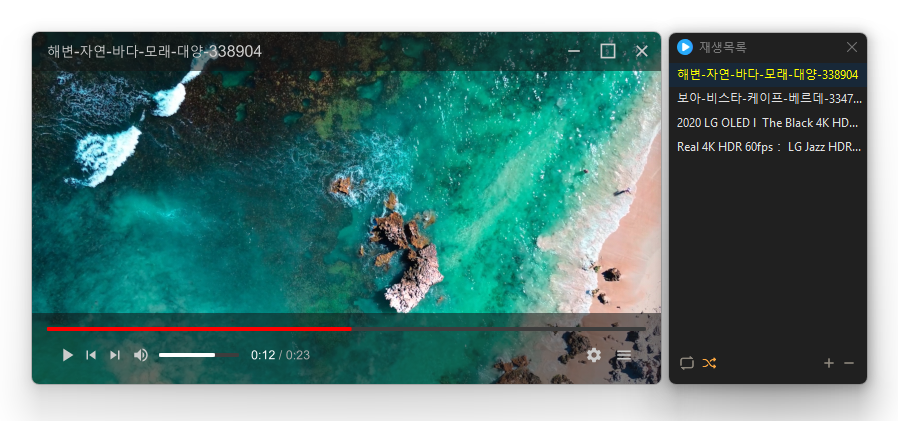
I have used several famous video players.
However, at some point, ads started popping up every time I ran the player.
I managed to overlook the ads.
But recently, I personally experienced a very popular player secretly installing malicious adware without the user's consent.
At that moment, I was sure.
"This is not right."
So I created it.
A video player without ads, adware, and unnecessary features — KPlayer.
What is KPlayer?
KPlayer is a video player for Windows built on the high-performance media engine, libmpv.
libmpv is an open-source engine trusted by developers worldwide, proven in terms of playback performance and stability.
Once installed and launched, you can focus on watching videos immediately without any ads. That’s the core philosophy of KPlayer.
Main Features
- Powerful playback features based on LibMPV
- Supports major video formats such as MP4, MKV, AVI, MOV, WMV, ASF
- Ability to add entire files and folders
- Drag to change order in the playlist
- Repeat and random playback
- Drag and drop files to add instantly
- Free resizing by dragging window borders (minimum 384×216)
License
- KPlayer is open-source software.
- You can use it freely in company, home, public offices, schools, and any place without restrictions.
- It can be freely distributed anywhere.
Download
Related Links
- Program Source: https://github.com/newkilho/KPlayer
- Update Notice: https://kilho.net/archives/notice/2940
Frequently Asked Questions (FAQ)
- Is KPlayer free?
Yes, KPlayer can be freely used at home, in companies, public offices, schools, and everywhere else. - What video formats does it support?
It supports major media formats like MP4, MKV, AVI, MOV, WMV, ASF, MP3. - Are there ads or adware included?
No, KPlayer has no ads or adware. No unnecessary programs are installed during installation. - Is it open-source?
Yes, KPlayer is distributed as open-source. You can check the source code directly, and it is developed transparently. - Can I add multiple files at once?
Yes, you can drag and drop multiple files or folders to add them to the playlist at once.
In Conclusion
KPlayer is a newly released program.
However, the MPV engine that KPlayer is based on is a powerful engine with many advanced features such as subtitle sync adjustment, color correction, audio filters, and hardware acceleration.
Currently, only some of those features are included, but we plan to gradually add various functionalities from MPV that everyone can easily use.
We will steadily develop a player that is ad-free, adware-free, and respects users.
We appreciate your interest and feedback!

Leave a Reply