


BankCleaner 0.9.1 Update
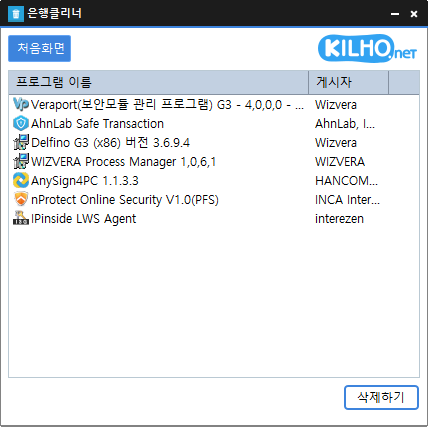
The BankCleaner (0.9.1) has been updated.
- You can easily remove mandatory security (?) programs that have to be installed.
- It offers the convenience of being used without installation as a single file.
Download
Related Links
- Update Notice: https://kilho.net/archives/notice/2940
License
- BankCleaner is Freeware.
- You can use it freely without space restrictions in homes, companies, public offices, schools, etc.
- You may distribute it freely anywhere.
Frequently Asked Questions (FAQ)
- Is BankCleaner free?
Yes, BankCleaner can be used for free at home, in companies, public offices, schools, etc. - Can I remove security programs from all banks?
We have confirmed removal of installed programs from major banks like Kookmin Bank, IBK, Woori Bank, NH Nonghyup. - Is it safe to delete programs?
BankCleaner only executes the removal programs provided by each security software. - Is installation necessary?
No, you can run it directly after downloading, without any installation process.
Usage Examples
- You can enhance your PC speed by neatly removing unnecessary security programs left after online banking.
- You can safely stop unnecessarily auto-starting bank-related programs, freeing up computer resources.
- You can maintain a comfortable environment even after online banking by regularly cleaning your PC.
Usage Tips
- You can click or drag to remove unnecessary items from the program list at once.
- Regularly using BankCleaner can keep the system clean by preventing leftover processes after online banking.
- Running it immediately after banking helps in removing unnecessary programs, aiding in personal information protection and security.

Leave a Reply