


Kalmuri 4.2.5 Update
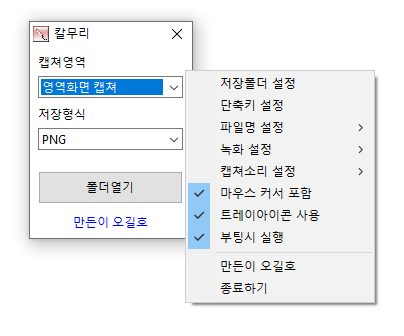
Kalmuri (4.2.5) has been updated.
- Supports various capture areas.
- Supports different file formats for saving.
- Text extraction through OCR functionality.
- Supports floating image features.
- Share links are generated through image storage.
- Allows video recording.
- Can extract colors.
- Usable without installation.
Homepage
- Kalmuri: https://kalmuri.kilho.net
History
- Version 4.2.5 (2026/06/29)
- Fixed an issue where area capture would occasionally stop
- Improved stability of area capture and screen recording
- Enhanced capture error improvement right after program startup - Version 4.2.4 (2026/06/03)
- Fixed a problem where color extraction could freeze occasionally
- Improved capture feature stability
- Resolved issues where the program could unexpectedly close in some situations
- Internal processing improvements for more stable use - Version 4.2.3 (2026/05/11)
- Improved stability of web browser capture
- Enhanced exception handling that could occur during capture - Version 4.2.2 (2026/04/13)
- Applied size limits to area capture to fix errors caused by excessively large area settings
- Improved safe input for area size settings according to screen size
- Stability improvements to ensure recording does not stop even if log file recording fails during recording - Version 4.2.1 (2026/03/20)
- Strengthened color copying feature to allow for copying in various formats (HEX, RGB, etc.) at once
- Improved settings selection method for a faster and more intuitive user experience
- Fixed issues with certain settings not being saved to enhance stability
- Enhanced file saving process to minimize the possibility of errors
- Tidied up unnecessary code for a lighter and faster execution environment
There is a new post. Click here to check the latest post.
Related Links
- Update Guide: https://kilho.net/archives/notice/2940
License
- Kalmuri is Freeware.
- Feel free to use it anywhere, including companies, homes, public offices, and schools.
- Distributions can be done freely anywhere.
Download
Frequently Asked Questions (FAQ)
- Is Kalmuri free?
Yes, Kalmuri can be used for free in companies, homes, schools, and public offices. - What image saving formats are supported for capture?
Supports PNG, JPG, WebP, BMP, and GIF formats. - Can I also record videos?
Yes, you can record videos of the entire screen or a designated area. - Can text be extracted from captured images?
Yes, text extraction within images is possible with Optical Character Recognition (OCR) functionality. - Does it require installation?
No, Kalmuri can be used directly as a single file without separate installation.

Comment (1)
감사합니다