


Kalmuri 4.2.4 Update
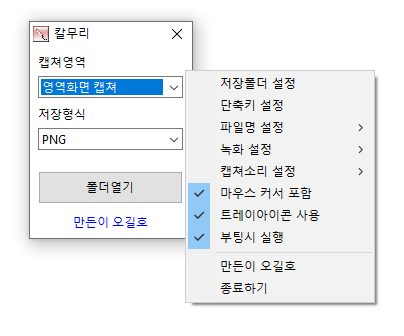
Kalmuri (4.2.4) has been updated.
- Supports various capture areas.
- Supports various file formats for saving.
- Extracts text through OCR functionality.
- Supports floating image functionality.
- Sharing links are generated through the image repository.
- Allows video recording.
- Can extract colors.
- No installation required.
Homepage
- Kalmuri: https://kalmuri.kilho.net
History
- Version 4.2.4 (2026/06/03)
- Fixed an issue where color extraction could intermittently stop
- Improved capture functionality stability
- Resolved issues causing unexpected program termination in certain situations
- Enhanced internal processing for more stable usage - Version 4.2.3 (2026/05/11)
- Improved stability for web browser capture
- Enhanced exception handling that could occur during capture - Version 4.2.2 (2026/04/13)
- Applied area capture size limits to fix errors caused by oversized area settings
- Enhanced safety for entering area size settings according to screen size
- Improved stability to ensure recording continues even if log file creation fails during recording - Version 4.2.1 (2026/03/20)
- Strengthened color copy functionality to allow simultaneous copying in various formats (HEX, RGB, etc.)
- Improved selection method for settings to provide a faster and more intuitive user experience
- Fixed issues with some settings not being saved, enhancing stability
- Minimized error occurrence during file saving process
- Cleaned up unnecessary code for a lighter and faster execution environment - Version 4.2.0 (2026/02/27)
- Improved screen recording method for enhanced recording stability and quality
- Automatic detection and compatibility improvement for audio output devices
- Resolved audio dropout issues during silent periods
- Enhanced recording video quality and frame stability
- Improved stability upon recording termination
There are new posts.Click here to check the latest posts.
Related Links
- Update Guide: https://kilho.net/archives/notice/2940
License
- Kalmuri is freeware.
- You can use it freely without space constraints in companies, homes, public offices, schools, etc.
- It can be freely distributed anywhere.
Download
Frequently Asked Questions (FAQ)
- Is Kalmuri free?
Yes, Kalmuri can be used for free anywhere, including companies, homes, schools, and public offices. - What image saving formats are supported?
It supports PNG, JPG, WebP, BMP, and GIF formats. - Can I record videos as well?
Yes, you can record videos of the entire screen or specified areas. - Can I extract text from captured images?
Yes, it is possible to extract text from images using Optical Character Recognition (OCR) functionality. - Is installation required for the program?
No, Kalmuri can be used directly as a single file without any installation.

Leave a Reply