


AutoClick 1.5.1 Update
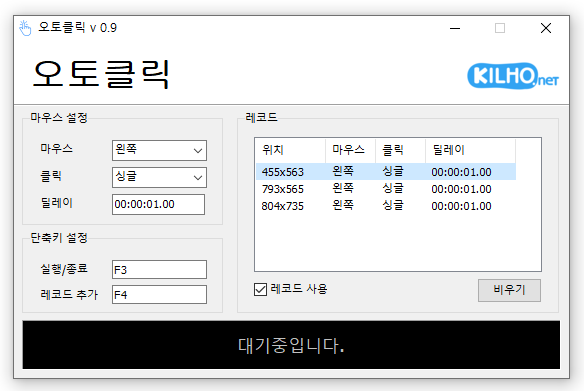
AutoClick (1.5.1) has been updated.
- This is a mouse auto-clicking program.
- You can add time and coordinates to use in various patterns.
- Details regarding clicks can be specified.
- It can be used without installation.
Homepage
- AutoClick: https://autoclick.kilho.net
History
- Version 1.5.1 (2026/04/21)
- Addressed display errors that may occur on certain PC environments
- Reduced instability that may happen in specific system environments during extended use
- Improved stability in display of record list on certain Windows environments
- Addressed resource-related exceptions encountered by some users - Version 1.5.0 (2026/03/20)
- Ability to set click intervals in a random range for more natural and safer clicking patterns
- Fine-tuned control over desired speed with minimum and maximum delay settings
- Enhanced time input method for quicker and more convenient settings
- Immediate reflection of setting changes for uninterrupted use - Version 1.4.9 (2026/02/20)
- Improved issues that prevented loading of record files - Version 1.4.8 (2026/01/26)
- Improved stability issues that could occur during long-term use under certain conditions
- Fixed errors encountered when loading files in certain environments - Version 1.4.7 (2025/12/30)
- Enhanced stability by fixing display errors in the record list
- Resolved unexpected errors that occurred during file saving process
There is a new post. Click here to check out the latest post.
Related Links
- Update Notice: https://kilho.net/archives/notice/2940
License
- AutoClick is Freeware.
- You can use it freely without restrictions in companies, homes, government offices, schools, and more.
- You are free to distribute it anywhere.
Download
Frequently Asked Questions (FAQ)
- Is the mouse auto-click program free?
Yes, this program can be used for free in all environments, including companies, homes, schools, and government offices. - Is installation required for the program?
No, it is provided in a form that can be used immediately without installation. - Can I click multiple locations sequentially?
Yes, it offers functionality to set multiple coordinates for sequential clicking. - Can I click at specific time intervals?
Yes, you can specify the time intervals for clicking in detail.

Leave a Reply