


AutoClick 1.5.0 Update
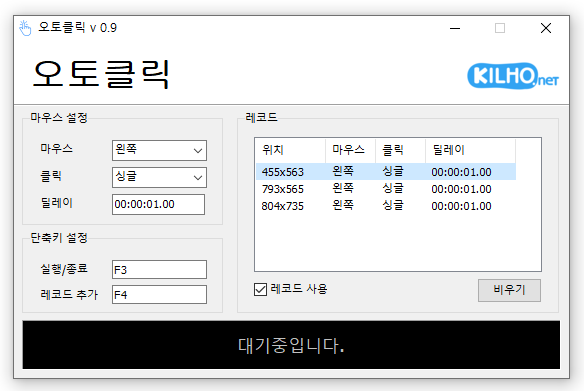
AutoClick (1.5.0) has been updated.
- This is an automatic mouse clicking program.
- You can add time and coordinates to use it in various patterns.
- Detailed specifications for clicks can be set.
- It can be used without installation.
Homepage
- AutoClick: https://autoclick.kilho.net
History
- Version 1.5.0 (2026/03/20)
- Click intervals can now be set within a random range for a more natural and safe clicking pattern.
- Minimum and maximum delay settings allow for more precise speed control.
- Improved time input methods support quick and easy settings.
- Changes in settings are reflected immediately for seamless use. - Version 1.4.9 (2026/02/20)
- Fixed issues that arose when record files could not be loaded. - Version 1.4.8 (2026/01/26)
- Stability issues that could occur during long-term use in specific situations have been improved.
- Fixed problems where errors occurred while loading files in certain environments. - Version 1.4.7 (2025/12/30)
- Stability improved by fixing errors that occurred while displaying record lists.
- Fixed unexpected errors that occurred during file saving process. - Version 1.4.6 (2025/11/15)
- Improved exit issues caused by incorrect record values.
There is a new post. Please click here to check out the latest article.
Related Links
- Update Notice: https://kilho.net/archives/notice/2940
License
- AutoClick is Freeware.
- You can use it freely without any spatial restrictions in companies, homes, public offices, schools, and more.
- It can be freely distributed anywhere.
Download
Frequently Asked Questions (FAQ)
- Is the automatic mouse clicking program free?
Yes, this program can be used for free in all environments including companies, homes, schools, and public offices. - Is installation required for this program?
No, it is provided in a form that can be used immediately without installation. - Can you click multiple locations in sequence?
Yes, it provides functionality to click in sequence by setting multiple coordinates. - Can you click at specific time intervals?
Yes, you can specify the time intervals for clicking in detail.

Leave a Reply