


StartCleaner 1.0.7 Update
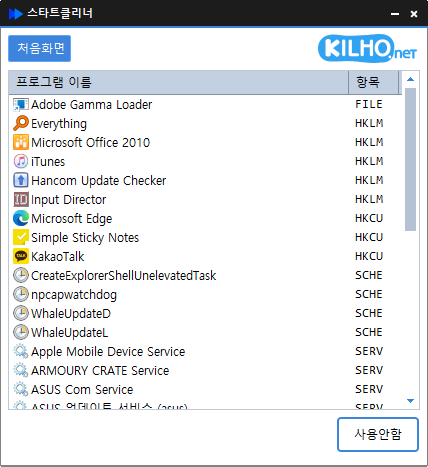
StartCleaner (1.0.7) has been updated.
- Effortlessly manage startup programs that run on boot.
- Integrate management of various items including the startup folder, registry, task scheduler, and services.
- Safely change settings by disabling instead of deleting.
Homepage
- StartCleaner : https://startcleaner.kilho.net
Update History
- Version 1.0.7 (2026/01/29)
- Improved stability during file saving errors - Version 1.0.6 (2025/12/24)
- Improved stability when retrieving auto-start items
- Fixed recognition errors of auto-start items occurring in some environments
- Reduced possibility of errors during internal processing
- Enhanced overall operational stability and reliability - Version 1.0.5 (2025/12/04)
- Improved initial preparation process during program start - Version 1.0.4 (2025/11/07)
- Added update notification status bar at the bottom of the program - Version 1.0.3 (2025/10/24)
- Improved execution stability in security programs or limited permission environments
Related Links
- Update Notice : https://kilho.net/archives/notice/2940
License
- StartCleaner is Freeware.
- You can use it freely without space restrictions in companies, homes, public offices, schools, etc.
- It can be freely distributed anywhere.
Download
Frequently Asked Questions (FAQ)
- Is StartCleaner free?
Yes, StartCleaner can be used freely in companies, home, schools, and public offices. - Is installation required?
No, you can run it immediately without any installation process. - Can it only be deactivated instead of deleted?
Yes, you can safely manage settings by disabling instead of deleting the program. - What items can be managed?
It manages all items that start automatically on boot, including the startup folder, registry, task scheduler, and service items.

Leave a Reply