


Kalmuri 4.1.8 Update
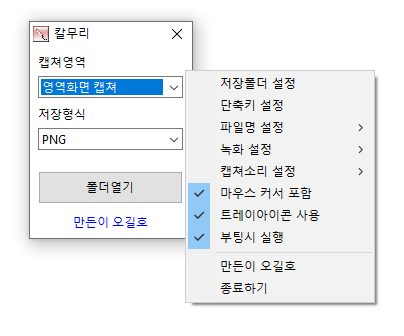
Kalmuri (4.1.8) has been updated.
- Supports various capture areas.
- Supports a variety of file formats for saving.
- Extracts text through OCR functionality.
- Supports floating image functionality.
- Creates shareable links via image storage.
- Allows for video recording.
- Can extract colors.
- Can be used without installation.
Homepage
- Kalmuri: https://kalmuri.kilho.net
History
- Version 4.1.8 (2026/01/22)
- Improved stability during capture and OCR processing
- Enhanced management of recording and capture operational status - Version 4.1.7 (2026/01/02)
- Reduced error occurrence during long-term use by improving capture stability
- Enhanced performance by reducing unnecessary resource usage during repeated captures
- Improved handling of tray icon related to program startup operations - Version 4.1.6 (2025/12/12)
- Added an option to copy to clipboard when saving images
- Separated mouse inclusion settings for capture/recording to improve usability
- Enhanced the layout of the popup menu for better visibility - Version 4.1.5 (2025/11/20)
- Improved folder selection compatibility for older Windows
- Fixed an issue where WebP quality settings were not saved - Version 4.1.4 (2025/10/25)
- Bug fixes and stability improvements
Related Links
- Update Notice: https://kilho.net/archives/notice/2940
License
- Kalmuri is free software.
- You can use it freely without space restrictions in companies, homes, public offices, schools, etc.
- It can be distributed freely anywhere.
Download
Frequently Asked Questions (FAQ)
- Is Kalmuri free?
Yes, Kalmuri can be used for free in companies, homes, schools, public offices, etc. - What image formats are supported for saving captures?
Supports PNG, JPG, WebP, BMP, and GIF formats. - Can I record videos as well?
Yes, you can record the entire screen or a designated area as a video. - Can text be extracted from captured images?
Yes, text extraction from images is possible using Optical Character Recognition (OCR) functionality. - Is installation required for the program?
No, Kalmuri can be used directly as a single file without separate installation.

Leave a Reply