


Kalmuri 4.3.0 Update
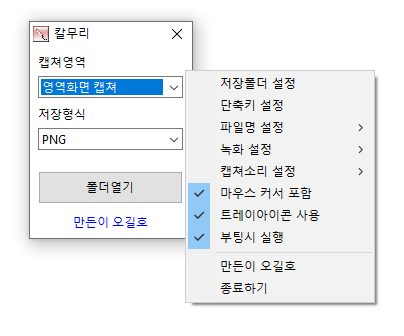
The Kalmuri (4.3.0) has been updated.
- Supports a variety of capture areas.
- You can capture the entire webpage.
- Supports various file formats for saving.
- Extract text through OCR functionality.
- Supports floating image features.
- A shared link is generated through the image repository.
- You can record videos.
- You can extract colors.
- Can be used without installation.
Homepage
- Kalmuri : https://kalmuri.kilho.net
History
- Version 4.3.0 (2026/08/28)
- Completely revamped the webpage capture function
- Captures faster and more reliably in the latest Edge and Chrome
- Saves long webpages as a single image at the scroll area end
- Automatically detects the installed browser for use without separate settings
- Accurately captures the current page even with multiple windows and tabs open
- Allows reliable recapture after browser closure or response delays
- Provides clear guidance on the cause in unusable environments
- Removed outdated capture methods to enhance compatibility with the latest websites - Version 4.2.7 (2026/08/14)
- Fixed issues where webpage capture failed in some environments and subsequent captures were blocked
- Fixed issues where the save folder selection did not work properly in certain situations - Version 4.2.6 (2026/07/23)
- Improved the issue where the webpage capture window closed in some computer environments
- Fixed the issue where the capture area changed unintentionally during screen recording
- Enhanced the clarity and smoothness of recording displays
- Improved OCR text saving stability and compatibility with Korean/special characters - Version 4.2.5 (2026/06/29)
- Fixed the intermittent interruption of area capture
- Enhanced the stability of area capture and screen recording
- Improved capture errors occurring right after program startup - Version 4.2.4 (2026/06/03)
- Fixed issues where color extraction could intermittently freeze
- Improved the stability of capture functions
- Resolved issues where the program could close unexpectedly in certain situations
- Enhanced internal processing for more stable use
Related Links
- Update Notification : https://kilho.net/archives/notice/2940
License
- Kalmuri is Freeware.
- You can use it freely without spatial restrictions in companies, homes, public offices, schools, etc.
- It can be distributed anywhere freely.
Download
Frequently Asked Questions (FAQ)
- Is Kalmuri free?
Yes, Kalmuri can be used for free in companies, homes, schools, public offices, and more. - What saving formats are available for captured images?
It supports PNG, JPG, WebP, BMP, and GIF formats. - Can I record videos?
Yes, you can record the entire screen or a designated area as a video. - Can I extract text from captured images?
Yes, the Optical Character Recognition (OCR) functionality allows for text extraction from images. - Is installation necessary for the program?
No, Kalmuri can be used directly as a single file without separate installation.

Leave a Reply