


KPlayer 1.0.0 Update
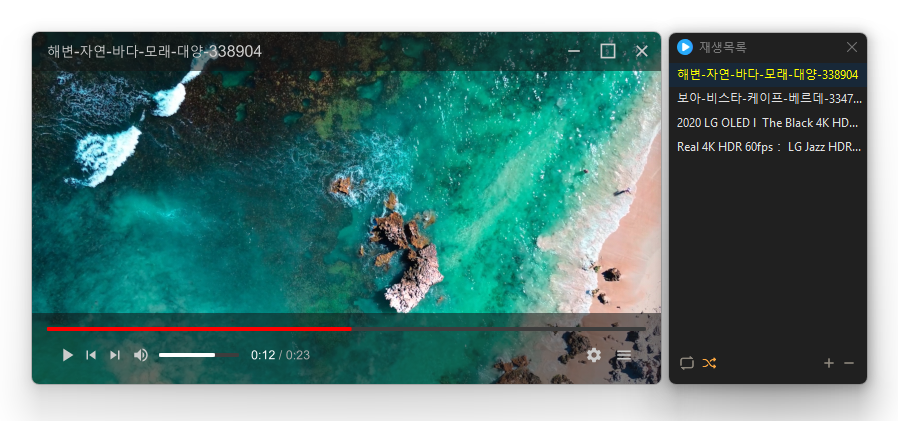
KPlayer (1.0.0) has been updated.
- Powerful playback features based on LibMPV
- Support for major video formats such as MP4, MKV, AVI, MOV, WMV, ASF
- Ability to add files and folders in bulk
- Drag to change order in the list
- Repeat and random playback
- Quickly add files via drag and drop
- Free resizing by dragging the window edges (minimum size 384×216)
Homepage
- KPlayer: https://kplayer.kilho.net
History
- Version 1.0.0 (2026/09/13)
- Added a start screen and right menu for faster file and folder opening via Ctrl+O
- Improved file opening capability to quickly find and play 38 different media formats
- Enhanced connection and file icon to open major media files immediately after installation
- Prevented issues in certain user environments where execution failed due to missing components
- Added customization feature for setting mouse actions and shortcuts as desired - Version 0.9.9 (2026/09/11)
- Added customizable mouse functions to change clicks, double clicks, middle button, and wheel actions freely
- Added shortcut settings for faster operations with preferred keys, supporting 29 key features
- Improved automatic selection of subtitle languages based on user environment
- Added an always-on-top button that can be turned on and off directly from the playback screen
- Fixed an issue where subtitles were not visible after configuration changes in certain user environments
- Improved mouse wheel functionality that was not working in some settings screens
- Fixed the problem where the screenshot folder selection dialog was hidden behind in some environments
- Simplified the settings screen and made it easier to find screenshot-related menus
- Added detailed customization options for subtitle font, color, thickness, outline, shadow, position, and alignment
- Improved the shaking of subtitle positions when moving the mouse
- Added a screen size menu for quickly switching from original size to full screen
- Maintained the last window size when opening videos, allowing starting in a way that suits the video size or full screen
- Improved retention of the last window position and size even after program exit - Version 0.9.8 (2026/09/05)
- Resolved an issue where settings were not being saved correctly in some user environments.
- Cleaned up unnecessary internal processes to enhance program stability.
- Improved network connection response to be faster and more reliable. - Version 0.9.7 (2026/08/28)
- Placing files in the main window replaces the existing list and plays immediately, adding files to the list window adds them to the existing list
- Improved so that sound automatically comes out when the volume is raised from mute
- Significantly improved startup speed which was slow in some network drive environments
- Bulk media files can now be added much faster and smoother
- Added an information panel to check file information and real-time playback information at a glance using the TAB key - Version 0.9.6 (2026/08/13)
- Expanded multilingual support for convenient use in various languages
- Fixed an issue where dragging and dropping files did not play immediately
Related Links
- Program Source: https://github.com/newkilho/KPlayer
- Update Notice: https://kilho.net/archives/notice/2940
License
- KPlayer is open source software.
- It can be freely used in various spaces like offices, homes, government offices, and schools without restrictions.
- It can be distributed freely wherever you want.
Download
Frequently Asked Questions (FAQ)
- Is KPlayer free?
Yes, KPlayer can be used freely in homes, offices, government offices, schools, and more. - What video formats does it support?
It supports major media formats like MP4, MKV, AVI, MOV, WMV, ASF, MP3, etc. - Does it include ads or adware?
No, KPlayer does not contain any ads or adware. No unnecessary programs are installed alongside it. - Is it open source?
Yes, KPlayer is distributed as open source. You can check the source code directly, and it is developed transparently. - Can I add multiple files at once?
Yes, you can add multiple files or folders to the playlist at once by dragging and dropping.

Leave a Reply