


Update: Shut Down Reservation 1.3.1
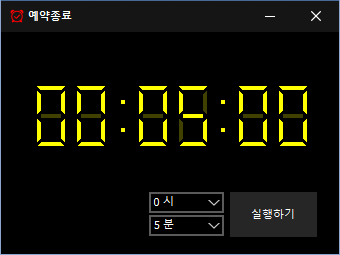
The Shut Down Reservation (1.3.1) has been updated.
- This is a computer shut down reservation program.
- It will shut down at the specified time.
- It includes a capture function to check the situation just before shutdown.
- It can be used without installation.
Download
Homepage
- Shut Down Reservation: https://ktimer.kilho.net
History
- Version 1.3.1 (2024/11/16)
- Added Italian, French, Russian, and Chinese - Version 1.3.0 (2024/11/03)
- Modified multilingual module
- Improved update notification module
- Support for hibernation mode
- Prevention of duplicate execution - Version 1.2.0 (2023/08/17)
- Multilingual support
- Fixed update check module - Version 1.0.0 (2022/09/07)
- Public release of the program
New posts are available. Click here to check the latest posts.
Related Links
- Update guide: https://kilho.net/archives/notice/2940
License
- The Shut Down Reservation program is Freeware.
- It can be used freely without spatial restrictions in companies, homes, government offices, schools, etc.
- It can be freely distributed anywhere.
Frequently Asked Questions (FAQ)
- Is the auto shut down program free?
Yes, this program can be used for free in all locations, including companies, homes, government offices, and schools. - Is installation required?
No, it can be run immediately without installation. - Why is the screen captured before shutdown?
It's to help easily check the situation during shutdown during the next boot by capturing the screen just before shutting down. - Can I cancel the shutdown reservation after setting it?
Yes, you can cancel or reset it after setting the shutdown reservation.
Use Cases
- You can automatically shut down your PC when downloads or backup tasks are expected to finish.
- You can save power by automatically turning off your PC before leaving your seat or going to bed.
- You can refer to the work screen at the time of shutdown the next day to continue working efficiently.
Usage Tips
- By setting a shutdown time in advance, you can reduce electricity usage and extend hardware lifespan.
- Important tasks can be quickly checked and continued during the next boot using the screen captured automatically just before shutdown.
- If you often leave your desk with the PC on, utilizing the shutdown reservation can enhance security.

Leave a Reply