


StartCleaner 1.1.1 Update
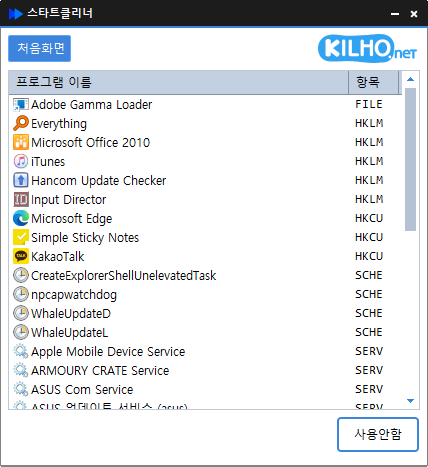
The StartCleaner (1.1.1) has been updated.
- Manage startup programs easily at boot.
- Integrate management of various items such as startup folder, registry, task scheduler, and services.
- Change settings safely by deactivating instead of deleting.
Homepage
- StartCleaner : https://startcleaner.kilho.net
History
- Version 1.1.1 (2026/07/20)
- Added functionality to cleanly delete startup programs and remaining traces in one go
- Enhanced pre-delete confirmations and safety measures to prevent accidentally removing necessary items
- Improved the reappearance of deleted programs in the list in some user environments - Version 1.1.0 (2026/04/30)
- Improved the display speed of the startup program list
- Optimized the parts that were slowing down due to repeated processing for better responsiveness
- Reduced lag by improving task scheduler loading speed
- Strengthened overall stability through internal code cleanup - Version 1.0.9 (2026/03/27)
- Fixed the issue where startup programs were displayed incorrectly
- Made task switching operate more reliably
- Increased the stability of the process for loading the list
- Enhanced overall stability through internal code cleanup - Version 1.0.8 (2026/02/29)
- Improved the stability of update data processing - Version 1.0.7 (2026/01/29)
- Enhanced stability when errors occurred during file saving
Related Links
- Update Notice : https://kilho.net/archives/notice/2940
License
- StartCleaner is Freeware.
- You can use it freely in any space, such as companies, homes, government offices, and schools.
- It can be distributed freely anywhere.
Download
Frequently Asked Questions (FAQ)
- Is StartCleaner free?
Yes, you can use StartCleaner freely in companies, homes, schools, government offices, etc. - Is installation required?
No, it can be executed immediately without a separate installation process. - Can I only deactivate without deleting?
Yes, you can safely manage settings by deactivating instead of deleting programs. - What items can be managed?
It manages all items that run automatically at boot, such as startup program folders, registries, task schedulers, and services.

Leave a Reply