


AutoClick 1.5.4 Update
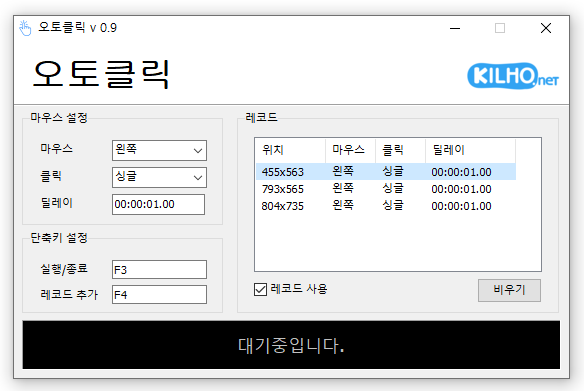
AutoClick (1.5.4) has been updated.
- This is an automatic mouse clicking program.
- You can add time and coordinates to use it in various patterns.
- Details for clicking can be specified.
- No installation is necessary; it can be used right away.
Homepage
- AutoClick: https://autoclick.kilho.net
History
- Version 1.5.4 (2026/08/13)
- Improved an issue where clicking positions could change in records containing specific coordinates.
- Prevented malfunctions caused by some abnormal record data.
- Unified the record file format to `.lst` for better file management.
- Enhanced the display of record lists in high resolution and screen scaling settings. - Version 1.5.3 (2026/07/11)
- Improved issues where clicks would stop or produce errors due to abnormal delay inputs.
- Modified the program to operate within stable ranges when large delay values are entered.
- Strengthened the stability of delay setting processing.
- Added support for Spanish. - Version 1.5.2 (2026/05/27)
- Prevented errors when loading damaged record files.
- Improved the safe loading of incorrect mouse/click settings. - Version 1.5.1 (2026/04/21)
- Addressed screen display errors that could occur in certain PC environments.
- Mitigated instability that could arise in specific system environments during extended executions.
- Improved the stability of displaying record lists in certain Windows environments.
- Resolved resource-related exceptions occurring in some user environments. - Version 1.5.0 (2026/03/20)
- Enabled the setting of random intervals for clicks, creating a more natural and safe clicking pattern.
- Allows more precise control of desired speed with minimum and maximum delay settings.
- Improved the time input method to support fast and easy configuration.
- Changes are reflected immediately for seamless usage.
Related Links
- Update notice: https://kilho.net/archives/notice/2940
License
- AutoClick is Freeware.
- You can use it freely without space restrictions in companies, homes, government offices, schools, etc.
- It can be freely distributed anywhere.
Download
Frequently Asked Questions (FAQ)
- Is the automatic mouse clicking program free?
Yes, this program can be used for free in all environments such as companies, homes, schools, and government offices. - Is installation required for the program?
No, it is provided in a form that can be used immediately without installation. - Can I click several locations in sequence?
Yes, it provides functionality to click in sequence by setting multiple coordinates. - Can I click at specific time intervals?
Yes, you can specify detailed time intervals for clicking.

Leave a Reply