


Kalmuri 4.1.7 Update
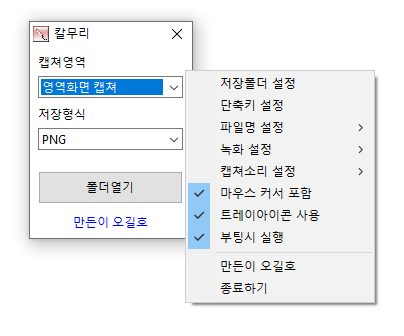
Kalmuri (4.1.7) has been updated.
- Supports various capture areas.
- Supports various file formats for saving.
- Extracts text using OCR functionality.
- Supports floating image feature.
- Share links are generated through the image repository.
- Can record videos.
- Can extract colors.
- Can be used without installation.
Homepage
- Kalmuri : https://kalmuri.kilho.net
History
- Version 4.1.7 (2026/01/02)
- Improved capture stability to reduce the likelihood of errors during prolonged use
- Enhanced performance by reducing unnecessary resource usage during repeated captures
- Improved handling of tray icon related to program start behavior - Version 4.1.6 (2025/12/12)
- Added option for clipboard to copy when saving images
- Separated mouse inclusion settings for capture/recording to enhance usability
- Improved popup menu configuration for better visibility - Version 4.1.5 (2025/11/20)
- Improved folder selection compatibility on older Windows
- Fixed issue where WebP quality settings were not saved - Version 4.1.4 (2025/10/25)
- Bug fixes and stability improvements - Version 4.1.2 (2025/10/24)
- Improved stability when terminating during area-specific recording
- Improved opening behavior of some windows and how settings windows are displayed
Related Links
- Update Notice: https://kilho.net/archives/notice/2940
License
- Kalmuri is freeware.
- It can be freely used in any environment, including companies, homes, government offices, and schools.
- It can be freely distributed anywhere.
Download
Frequently Asked Questions (FAQ)
- Is Kalmuri free?
Yes, Kalmuri can be used for free anywhere, including companies, homes, schools, and offices. - What image formats does the capture support?
It supports PNG, JPG, WebP, BMP, and GIF formats. - Can I also record videos?
Yes, you can record video of the full screen or a specified area. - Can you extract text from captured images?
Yes, text extraction from images is possible with Optical Character Recognition (OCR) functionality. - Is installation required for the program?
No, Kalmuri can be used immediately as a single file without any separate installation.

Leave a Reply